Pinterest 下载器
下载 Pinterest 视频、高清图片 - 4K
如何使用 PinGet 下载 Pinterest 视频
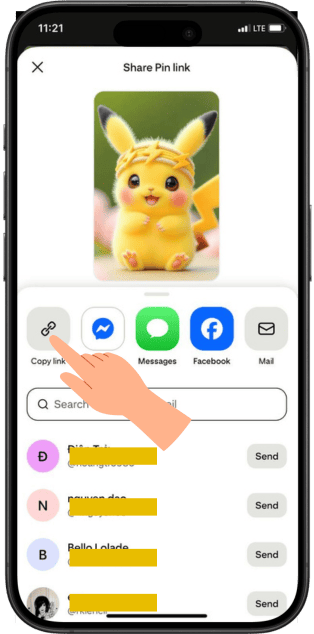
1复制 Pinterest 链接
在应用程序或浏览器中打开 Pinterest。 找到您想下载的视频或图片。 点击“分享”→“复制链接”。
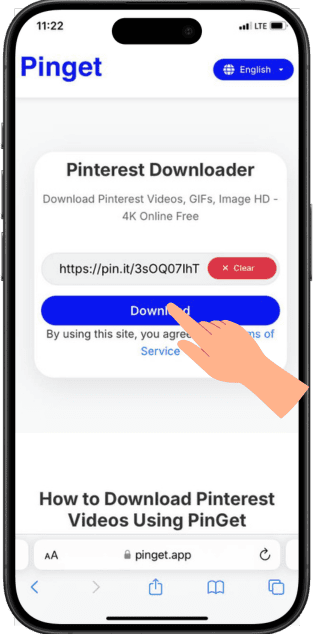
2将链接粘贴到 PinGet 中
访问 PinGet.app 将复制的 Pinterest 链接粘贴到输入框中。
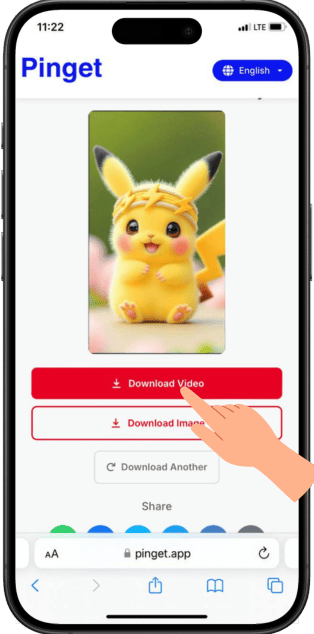
3点击“下载”
PinGet 会自动处理链接。 选择您喜欢的格式(视频或图片)。
Pinterest视频下载 – 免费高清无水印下载 | PinGet
Pinterest is full of creative ideas - from recipes, fashion, DIY projects, to inspiring videos that spark your imagination.
But there’s one small problem: Pinterest doesn’t allow users to directly download videos or images to their devices.
That’s exactly why PinGet.app was created.
PinGet is a free online Pinterest video downloader that lets you save videos and images from Pinterest in seconds - no app, no registration, no watermark.
Just copy the link, paste it, and hit Download.
It’s fast, simple, secure, and always free.
Why Choose PinGet?
When you search for Pinterest downloader online, you’ll find hundreds of tools.
However, most of them are slow, full of ads, or deliver poor-quality downloads.
PinGet is built differently - it focuses on speed, quality, and user experience.
Here’s why thousands of Pinterest users trust PinGet every day:
-
⚡ Lightning-fast downloads
Our optimized global servers handle Pinterest video links in seconds. -
💎 High-quality results (HD/Full HD)
PinGet keeps the original resolution - no compression, no watermark. -
🔒 100% safe and private
We don’t store your data or track your downloads. Everything happens securely via HTTPS. -
🌐 Works on all devices
Whether you use Android, iPhone, Windows, or Mac - PinGet runs smoothly in your browser. -
🚫 No annoying ads or pop-ups
Enjoy a clean, clutter-free experience focused purely on downloading content.
With PinGet, you don’t just download Pinterest content - you keep the inspiration that matters to you.
Features of PinGet Pinterest Video Downloader
PinGet isn’t just a download tool - it’s a complete solution to make Pinterest more accessible and convenient.
1. Download both Pinterest videos and images
You can download any video or image (Pin) from Pinterest - no limits, no restrictions.
2. Maintain original quality
All media is saved in its original HD or Full HD resolution, exactly as seen on Pinterest.
3. 100% web-based
No app, no installation. Just open your browser, paste your Pinterest link, and hit download.
4. Super-fast processing
PinGet’s global CDN ensures your video is ready to download in just seconds.
5. Modern, user-friendly interface
Clean design and simple steps - anyone can use it easily, anytime.
Designed for speed and simplicity - with PinGet, you can download Pinterest videos in under 10 seconds.
How PinGet Ensures High-Quality Pinterest Downloads
At PinGet, we know Pinterest users care deeply about visual quality.
That’s why our downloader is optimized to preserve every pixel and color detail.
-
✅ Original HD quality - no downscaling or compression.
-
🚫 No watermark - clean, original Pinterest content.
-
🧠 Smart file handling - ensures smooth playback on all devices.
-
⚙️ Optimized servers - fast delivery without sacrificing clarity.
What you see on Pinterest is exactly what you get when you download with PinGet.
Pinterest Downloader for Mobile & PC
PinGet works perfectly across all devices and platforms.
Whether you’re at home or on the go, you can save Pinterest content anytime.
For Mobile (Android & iPhone)
-
Open Pinterest and copy the post link.
-
Visit PinGet.app on your mobile browser.
-
Paste the link and hit “Download”.
-
Save the file to your gallery.
For Desktop (Windows, macOS, Linux)
-
Copy the Pinterest video or image link.
-
Open PinGet.app on your browser.
-
Paste the link, click download, and save it directly to your computer.
PinGet Pinterest Downloader Online is a truly cross-platform tool - no installation, no app, just pure simplicity.
Download Pinterest Videos & Photos in One Place
PinGet gives you the freedom to download both videos and photos from Pinterest without switching between tools.
You can easily save:
-
🎥 DIY and craft tutorials
-
🍳 Cooking and recipe videos
-
💄 Fashion & beauty inspiration
-
🏡 Home décor and design ideas
-
📸 Motivational image collections
Instead of saving Pins inside your Pinterest board, now you can download them all and keep them forever, even offline.
With PinGet, your creative inspiration is always just one click away.
Pinterest Downloader Alternatives – Why PinGet Wins
There are plenty of Pinterest downloader tools online - like ExpertsPHP, SnapSave, or SaveFrom.
But most are cluttered with ads, slow servers, or limit free downloads.
PinGet is built to be different - simple, fast, and ad-free.
| Feature | PinGet | Other Downloaders |
|---|---|---|
| Completely Free | ✅ Yes | ⚠️ Limited or paid |
| No Watermark | ✅ Yes | ❌ Often adds logos |
| Speed | ⚡ Very Fast | ⏳ Slower |
| Ease of Use | ✅ One-click | ❌ Complicated |
| No Ads / Pop-ups | ✅ Clean Interface | ❌ Many Ads |
| Security | ✅ Secure & Private | ❌ Unclear Policies |
PinGet combines speed, security, and a clean design - giving you the best Pinterest downloading experience available today.
Download All Pinterest Media in One Click with PinGet
With PinGet, you can download any Pinterest video or photo in just one click -
fast, secure, and totally free.
No installations. No ads. No watermarks.
Just pure, high-quality downloads at lightning speed.
Start now and keep your favorite Pinterest ideas forever:
👉 Paste your Pinterest link into PinGet and download in seconds!
常见问题
1. PinGet 是免费使用的吗?
是的。PinGet 完全免费,并且没有下载限制。
2. 我可以在手机上使用 PinGet 吗?
当然可以。PinGet 在 Android 和 iOS 浏览器上运行完美
3. 我下载的视频会有水印吗?
不会。所有视频和图片都会干净下载,没有任何水印。
4. 我也可以下载 Pinterest 图片吗?
可以!PinGet 支持高质量下载视频和图片。
5. 我需要注册或登录吗?
不需要。PinGet 完全匿名,无需账号
6. PinGet 安全吗?
安全。您的下载会被安全处理,我们绝不会存储或跟踪您的数据。